


Culmination Project: Healthy Recipes and Tracker App
- Kate Fox
- Oct 7, 2019
- 17 min read
Updated: Oct 22, 2020

(September 18th)
Day 1: Brainstorming
There are hundreds of apps for all kinds of subjects I started my brain storming process with writing out subject I found interesting:

App to help fishermen and women know what bait is right to use on certain fish.
App to help with better time management
Agenda
Daily organizer
Vacation check off list
Video game time tracker (day, week, month, year, all together)
Sell & buy app
Meditation app
Connect with others interested in meditation
Fresh recipes for all sorts of diets
A cuter weather app
New emojis to add to text messages
Kick stater
Personal stylist
Hiking trails (start to end)
After formulating my ideas, I did a little research on three topics that interested me the most:
1. Vacation check list app:
I considered other features that could be included in this type of app if furthered:
Select your vacation destination
Suggested options to select
Add your own items
How long the vacation is for
Suggest how many of certain items to bring
Dates to include a reminder alert (hours, days, weeks, months)
Countdown (hours, days, weeks, months)
Add more items whenever
Checklist of what to do when there
Allow someone to make reservations from the app by forwarding the user to the reservation cite
Things to do suggestions within areas.
Links to coupons for restaurants or spas

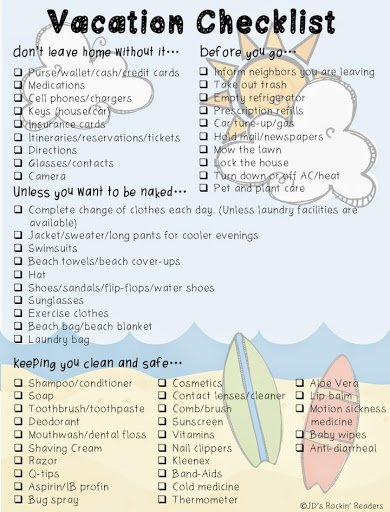

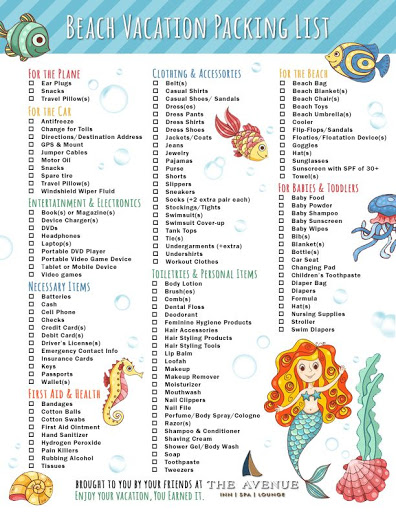

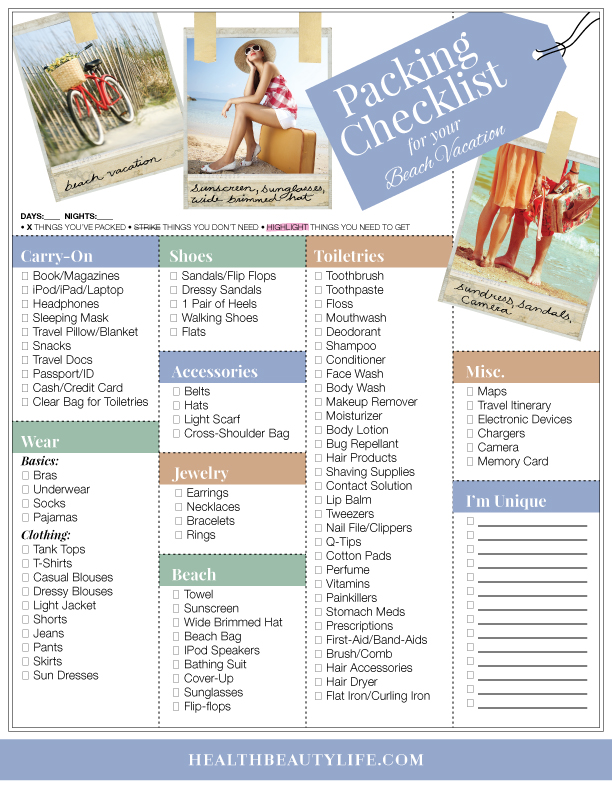

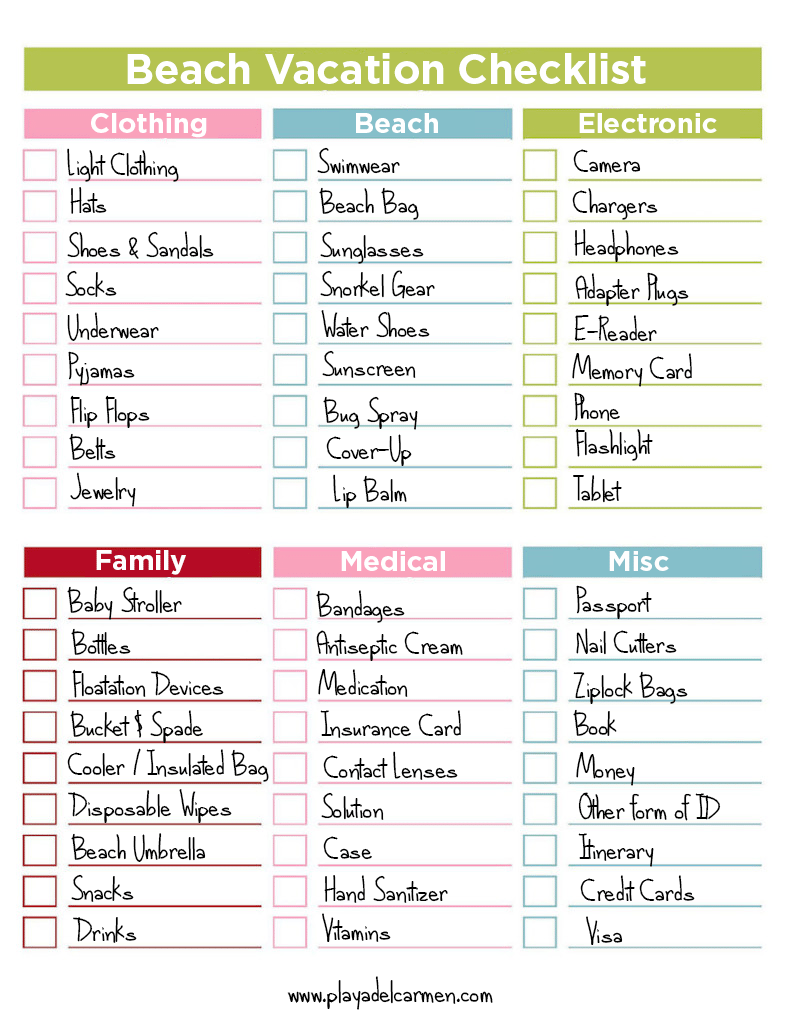
Out of all the apps for IOS under "Vacation checklist", These competitors showed up:
TripIt: Travel Planner
Trip Scout
Packing list checklist
Vacation Planner
Travelocity Hotels & Flights
Roadtrip Planner Viewer
Trip Planner
Vacation Deals & Cruises
Vacation Countdown
Orbitz hotels & flights
Cruise Norwegian - Plan & chat
Hitlist
Disney cruise Line Navigator
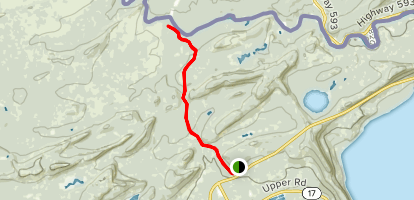
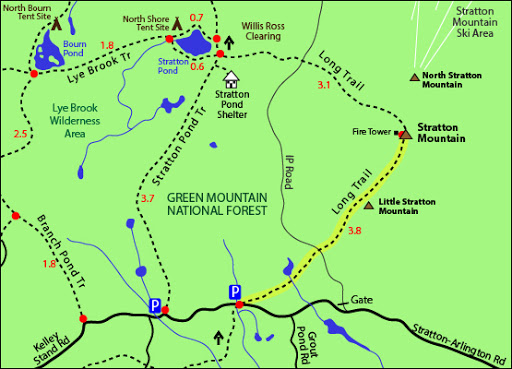
2. Hiking trails (start to end):
I considered other features that could be included in this type of app if furthered:
Map
USA only
Mountain names
Trails
Names
Beginning to end mark
Distance
Time
Different states
1. Colorado
2. Utah
3. Texas
4. Missouri
5. California

Out of all the apps for IOS under "Vacation checklist", These competitors showed up:
PeakVisor
AllTrails: Hike, Bike & Run
Gaia GPS Hiking, Hunting maps
Hiking project
Topo Maps+
Hiking Trails
REI Co-op National Parks guide
Footpath Route Planner
Topographic Maps & trails
Trails . Outdoor GPS Logbook
TrailLink: Bike, Run & Walk
Guthook guides: Hike Offline
ViewRanger: Hike, Ride or Walk
Strava: Run, Ride, Swim
Outtt
3. Fresh recipes for all sort of diets:
I considered other features that could be included in this type of app if furthered:
Daily suggested recipes
Facial recognition to move on into the recipes
Search specific ingredients you would like in your recipe
Calorie chart
Recipe calendar chart for days the user would like to cook on that works with their schedule.
Portion sizes for 1, 2, 3, or 4 people
Barcode scanner
Select your specific diet:
Around 30 or 40 recipes for each diet
1. Keto
2. Vegetarian
3. Paleo


Out of all the apps for IOS under "Vacation checklist", These competitors showed up:
Lifesum
Myplate calorie count
My fitness pal
My diet coach
Lose it!
Noom
Carb manager
Control my weight
Zero-fasting tracker
WW (weight watcher)
30 day fitness
Calorie counter
Diet tracker
Keto diet & ketogenic
Happy scale
Atkins carb & meal
Foodvisor
Simple food tracker
Body fast intermittent fasting
My macros
Calorie counter by fatsecret
Crometer
Fooducate diet & nutrition
Daily water tracker
8fit workouts & meal planner
Keto diet app
I decided to go further with my fresh recipes for specific diets idea. I found a lot of passion coming out as I did my research under this topic and wanted to figure out how I could create an app different enough to make my app stand out from my competitors.

After all of this research, I decided to go on a whim and allow this opportunity to help create an app for my internship, Initium Health. I get together with my bosses and our Principal of the comany to further discuss the premisses of what the app is for and what it could do. Based on the information provided to me, I began to create a pitch for the idea to present to my classmates.
(September 25TH)
THE PITCH
The pitch I provided to my classmates went well but did not get the feedback I would have like to due to the lack of knowledge my classmates had on the subject, 340B. Even my teacher, Stephan, did not know what a 340B was which made it difficult for him to understand how my app would be different compared to other 340B apps that currently exist.


I was proud of the work and information I had gathered so far for the development of this application. I knew this would be a challenge for me due to having little knowledge about what a 340B is. After much consideration of going one way or another, I later decided it would be best to stick with the subject I had more passion researching which was the fresh recipes for specific diets idea.
Objectives For Week 2:
System Concept Statement (due October 9)
Contextual Inquiry Strategy (due October 9)
Existing System Inquiry & Use Strategy(due October 9)
(October 7th)
Week 2
Due to my decision to go back to my original idea I started gathering additional information and put together my Goal-directed design strategy (quantitative and qualitative research, competitive audit, stakeholder interview questions, product vision statement, budget, schedule, technical challenges, core business drivers, etc.), three personas, framework sketches, and logo sketches.
GOAL-DIRECTED DESIGN STRATEGY
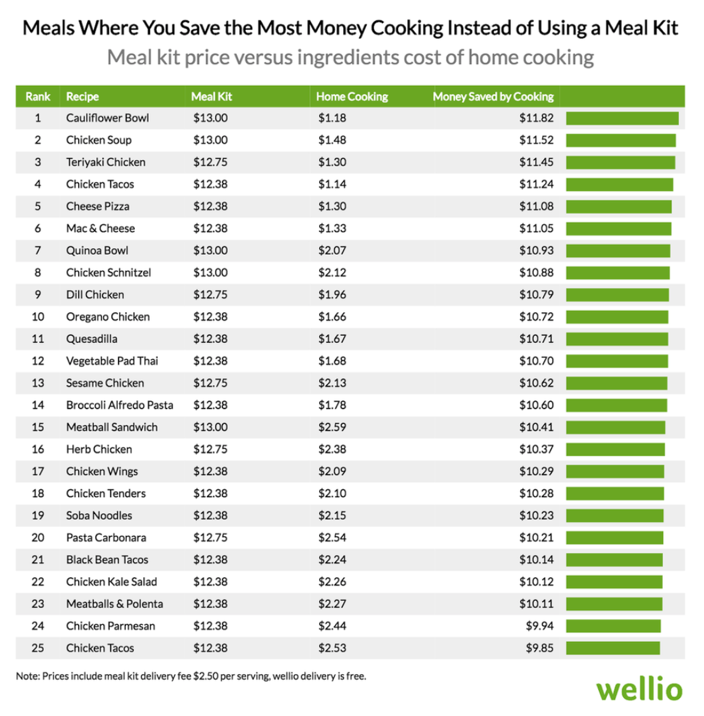
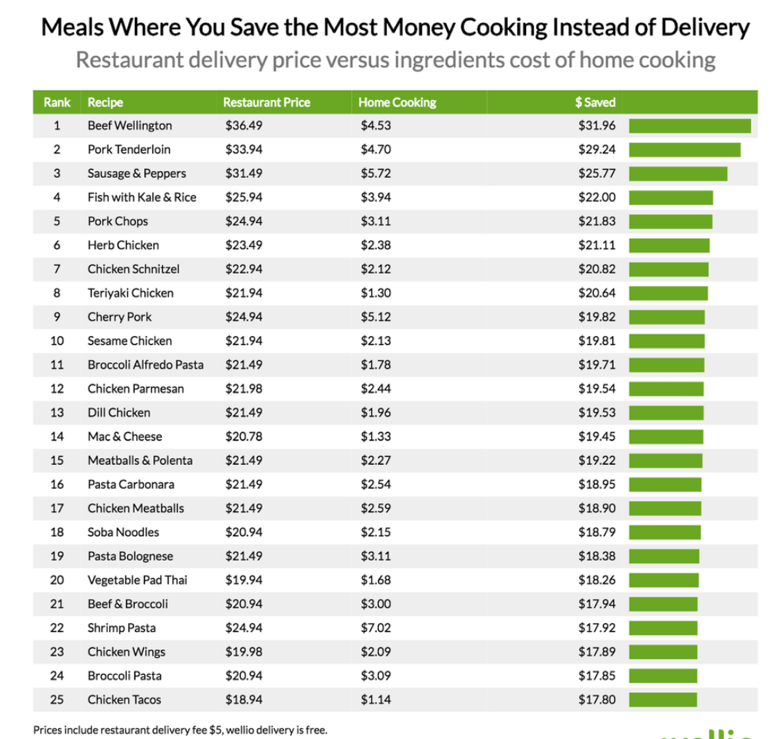
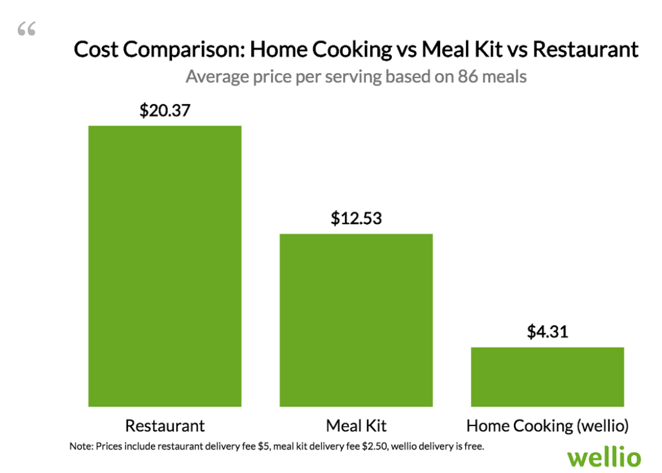
Quantitative research:




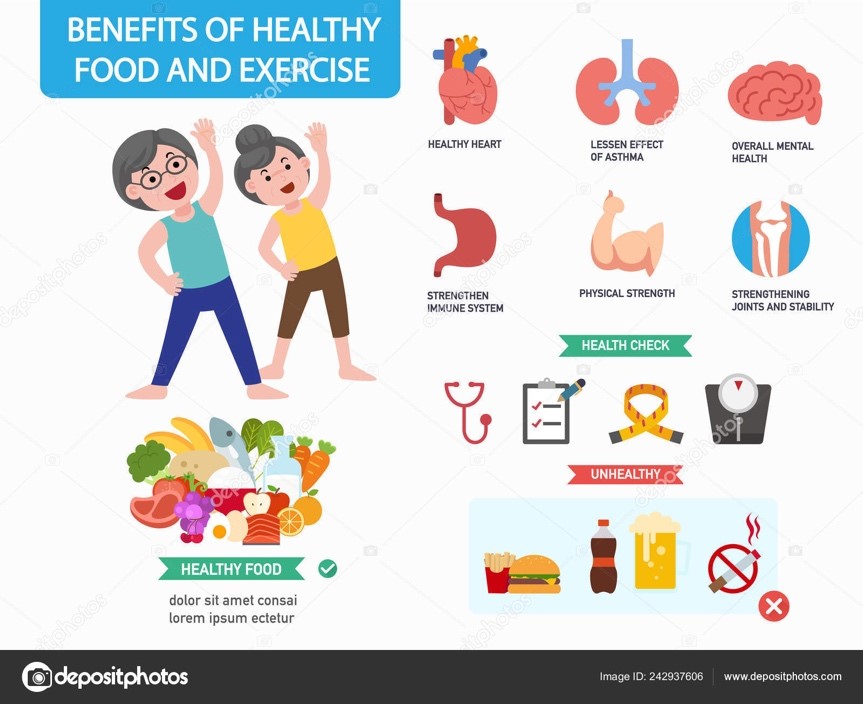
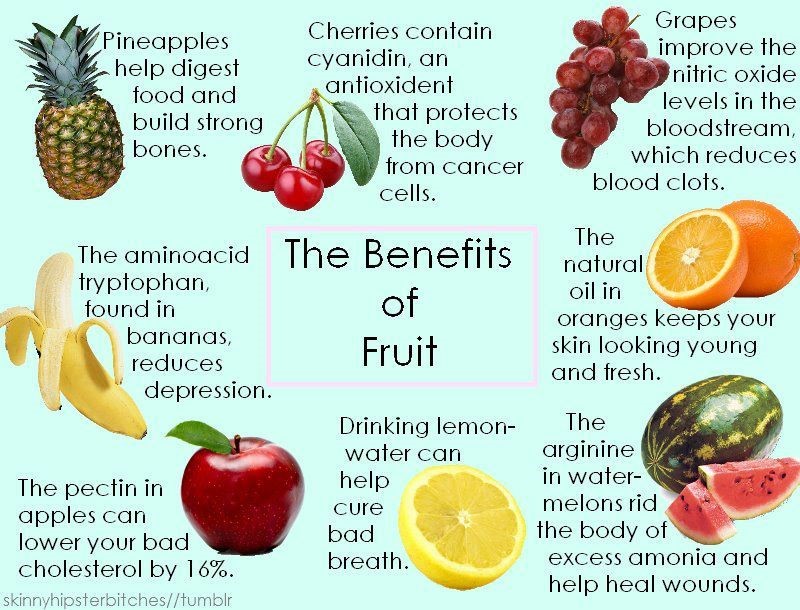
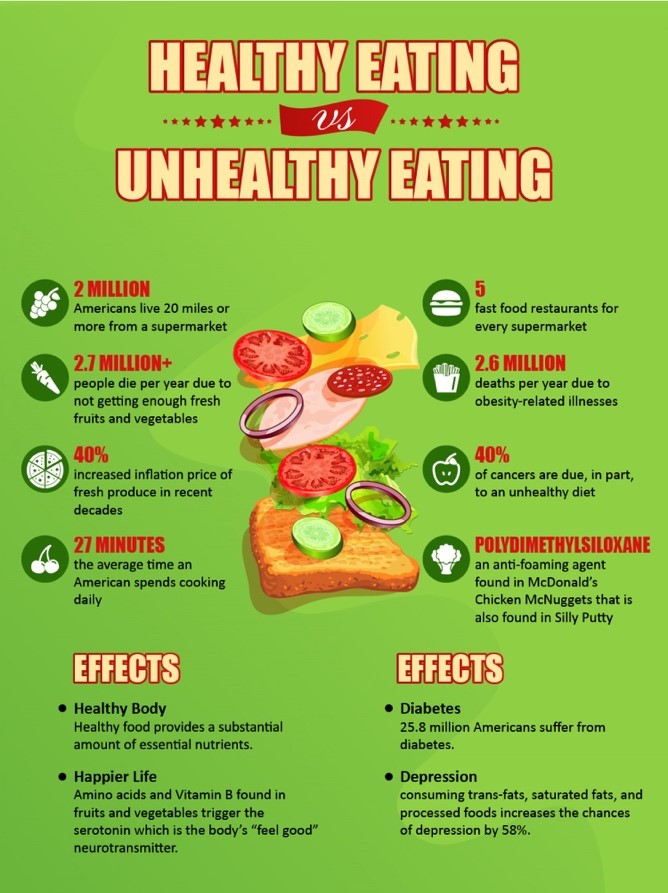
Qualitative Research:





Competitors:
Competitor 1: Tasty
Website Observations: Colorful, on trend with holidays, recipes that never seem to end, and categories such as back to school, weekend meal prep, romantic dinners, best vegetarian, healthy eating, keto, one-pot recipes, easy dinner, and no bake desserts.
Strengths: Promote themselves with 5+ social media platforms. Apps provided for iOS and Android. Have cooking products and utensils.
Weaknesses: Website is a big disorganized. It is not directed to healthy foods only. Promote a lot of unhealthy meals on their homepage.
Strategies: Promote on Instagram, Facebook, Twitter, Snapchat, and YouTube.
Competitor 2: YouTubers (Blogilates)
Strengths: She does the workouts with her audience. She encourages her viewers to keep going and stay motivated throughout the workouts. Promotes her additional workouts and recipe bundles within her videos. Works with Popflex to promote more healthy living. Provides a printout workout chart and water intake chart.
Weaknesses: Mainly promotes her workouts. Only offers a limited number of healthy recipes. Does not promote calorie charting.
Strategies: Promotes her workouts on YouTube with monthly workout Challenge routines by a printout or videos. Insists her followers to pay for her recipes and workout bundles. Works with another company, Popflex, which she has her own athletic clothing line with and gets her 4.72M subscription following to get.
Stakeholder Questions:
Expectations about the project’s long-term impact
· What will be different one year after this project is completed?
· How does this project support the mission of the department, division, and/or company?
· In what ways do you see the project helping you achieve your mission?
· What problems do you see this project solving? What is the evidence of the problems?
· In what ways will this project be a solution to the problems?
· Which of these problems is the most important to solve?
· What happens if this project is not done?
Expectations about project completion
· What, precisely, do you expect the project team to create or implement as part of its responsibilities?
· What are the most important immediate outcomes you see for this project?
· What tangible changes do you expect to see at the completion of this project?
· What, specifically, do you expect to be different when this project is completed?
· If the project team could accomplish just one thing, what would that be?
· How will you know if this project has been successfully completed?
· When this project is officially completed, what will make you say: “This project was right on target?”
Expectations about the process of carrying out the project
· What do you think could go wrong with this project?
· What are the major risks to the project’s success?
· What are the most important problems to avoid in completing this project?
· What suggestions do you have regarding how the project team should approach its job?
· What concerns you most about this project?
· If you were to identify the major problem to be faced by the project team, what would it be?
· What are the major obstacles or impediments to the success of this project?
Product Vision Statement:
Many single or family-oriented people cook meals most days. A lot of times, it becomes frustrating to decided what to make for dinner. This sometimes causes time to be wasted so people get hangry and end up deciding to eat out or order delivery instead. Some people are interested in starting a new diet but end up only doing it for one week and stop because they see no progress and feel unmotivated. For my consumers who want to stay on top of a healthy lifestyle and want to keep track and stay motivated to be healthy, my app will allow them to select the diet they would like to start or already have and are curious about seeing new recipes weekly, would like to see daily suggestions, meal prep options, calorie chart if they are cuprous, ingredient portions for 1, 2, 3, and 4 people, and have the ability to search specific ingredients they are interested in having in their next meal. Unlike tasty recipes or youtubers, my application combines everything someone becoming or already healthy need to keep track of a healthier lifestyle without the pressure.
Budget & Schedule:

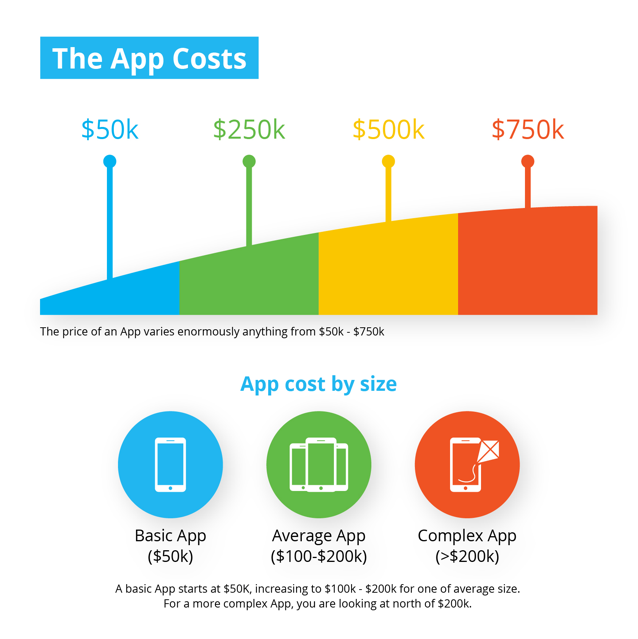

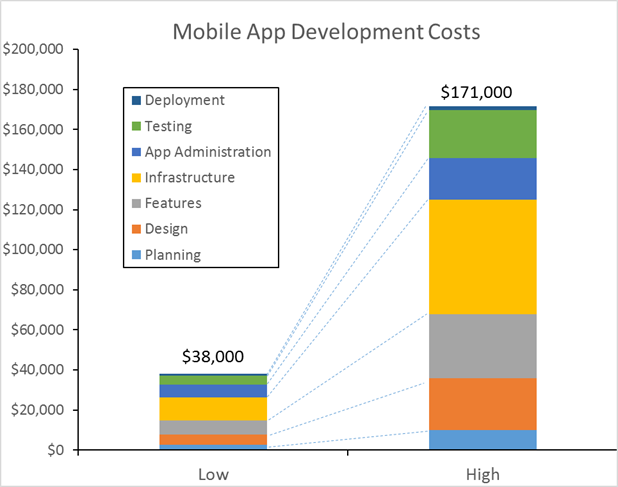
Technical Challenges:
· Making myself different compared to my competitors
· Manage finances (if this was a real issue)
· Deciding to work with IOS or Android
· Promoting the app
· Development technology
PERSONAS (Drafts)
Primary:

Secondary:

Tertiary:

SITE ARCHITECTURE STRATEGY SKETCH

LOGO SKETCHES

(October 9th)
System Concept Statement
(Design Concept)
Concept:
Pick your diet with recipes and grocery/calorie tracker.
Detail:
This app will included a calories tracker, a calendar to manage grocery shopping and when to cook meals or preped meals, hand motion sensor to go through recipe steps, daily suggested recipe, ingredient search feature, and portion sizes for ingredients ranging from 1-4 people serving sizes.
Customer Needs:
Current apps available individually promote one form of diets or are only meant as a calorie chart causing consumers to have multiple apps on their phone or tracking by paper which get misplaced. Putting both together plus additional features which do not exist as an app but have been suggested by individuals.
Issues:
How do I create an app that stands out from the other dietary and health tracker apps that exists?
Contextual Inquiry Strategy
I will be creating a survey in google Drive. I will be promoting my survey to users by posting it on social medias such as Instagram and Facebook. On Facebook, The preview image of the survey will show up which I believe will help grab peoples attention as well as my work choice. On Instagram I will be using the same language as I posted within Facebook but include an image of food being prepared. Instagram will be difficult for people to grab the link but I will include that I have the link posted on my facebook as well.
Existing System Inquiry & Use Strategy
Objectives For Week 3:
Contextual Inquiry Outcomes & Analysis (due October 16)
Interactive Design Requirements (due October 16)
Design Production Schedule (due October 16)
User Models (Personas) & Usage Models (due October 16)
(October 16th)
Week 3:
Contextual Inquiry Outcomes & Analysis
This week is the beginning of gathering personal

information and insights from my users. I created a tree map and two versions of six phone screen sketches. The six phone screen sketches I created will be used during my interviews for my user testing outcomes. The interviews consider A/B testing and first click testing from the sketches.
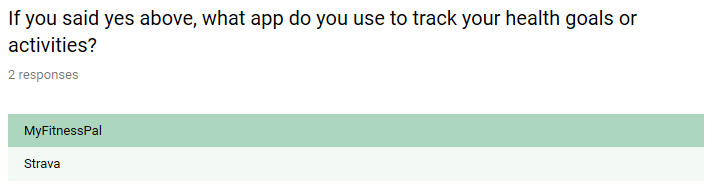
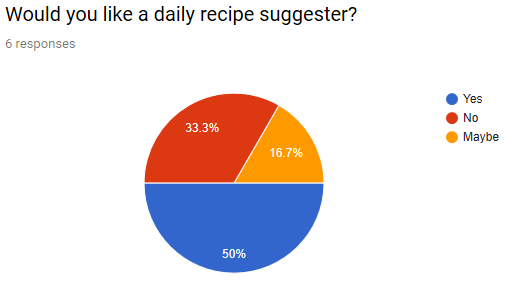
I received six responses from the survey I created last week. I received some interesting feedback.
The majority of the answers I received were 50/50. My users are iPhone users so I will be continuing with that layout when I start putting together my prototypes.




After my user took the survey, I conducted an A/B test and first click test. I provided two versions of six phone screen sketches to my users during the interviews. As a way to understand my users point of view of what I was showing them, I had them take a green pen to mark on features and concepts they found intriguing and a red pen for features and concepts they found confusing or not necessary for the application. The results and feedback I gained was very informative. I was able to formulate more ideas for features to include in the final application and where to move some features.
A/B Testing & First Click Testing Results
Interview 1: Stafford


Interview 2: Hannah


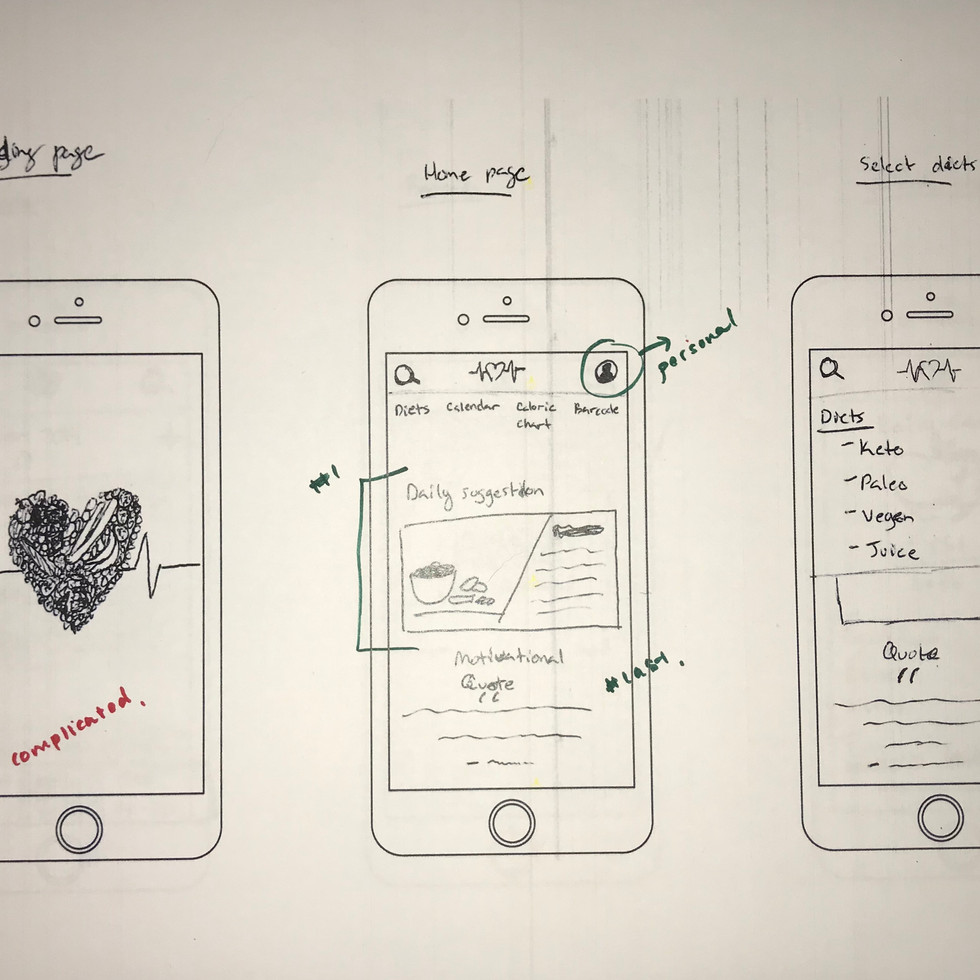


Interview 3: Galen


Interview 4: Evie


Interview 5: Dave


Interview 6: Brandon


Based on the information I gained from my interviews, I will be considering to:
Include a feature to connect apple health watches to calculate calories.
Use the heart shaped food with heartbeat design for the logo.
Incorporate both calendar designs together.
Includi the manually typing barcode option with the barcode scanner.
Includie the manually typing barcode option with the barcode scanner.een.
Have the trend page that transitions the user to their calorie chart.
Only having a search icon under the diets page and when filling out calorie food items.
Have the account icon at the top right corner.
Include a helpful quote and image to help motivate the user but placed at the bottom of the page.
Have the app open to the calories page right away for returning users.
Include a suggested recipe on the home page.
Design Production Schedule

Interactive Design Requirements
Problem Statement:
Staying on track to a healthy lifestyle can be difficult at times. Sometimes it would be interesting to see different diets and how they react to my body type without doing a ton of research of what I can or can’t eat. There are so many application options on keeping track of calories, finding recipes, and knowing when to go grocery shopping and cook/prep meals but no application provides everything in one.
Vision Statement:
For my consumers who want to stay on top of a healthy lifestyle and want to keep track and stay motivated to be healthy, my app will allow them to select the diet they would like to start or already have and are curious about seeing new recipes weekly, would like to see daily suggestions, meal prep options, calorie chart if they are curious that connects to apple health watches, ingredient portions for 1, 2, 3, and 4 people, and have the ability to search specific ingredients they are interested in having in their next meal. Unlike tasty recipes or youtubers, my application combines everything for my users to help them keep track of a healthier lifestyle without the pressure.
Revised Personas:
Primary:

Secondary:

Tertiary:

Context Scenarios:
Scenario 1: Jennifer’s alarm goes off at 6:00am. She like to hit snooze a couple time eventually getting out of bed around 6:30am. Once she officially gets out of bed, she grabs her already brewed coffee that she sets to be ready by 6:15am so it is cool enough to drink right away. She grabs a protein bar and sits out on her balcony to eat and drink her coffee. After drinking her coffee and eating her protein bar, it’s around 6:50am and Jennifer gets ready for her quick run outside. She does a 2 mile run around her neighborhood between an hour to an hour and 10 minutes. When she gets home, she begins to make breakfast of two eggs, two slices of bacon with a side of half a sliced avocado and one slice of toast with butter and cinnamon on it. Jennifer finishes her breakfast in time to leave for work at 9am grabbing her leftovers for lunch from the night before.
Scenario 2: Kristen’s alarm goes off at 4:45am. She gets ready and dressed for work. Around 5:30am, she has time to have a cup of coffee for an hour before leaving for work. Her husband wakes up just as Kristen leaves the bathroom from getting ready for work and starts brewing coffee for them both. They sit and drink their coffee as Kristen posts photos of the cakes and deserts she created the day before and sees what everyone else was up to the day before sense she is to tired after work to look before passing out. 6:15am hits and her oldest child wakes up to get ready for school but has a cup of coffee with her mom before Kristen leaves for work.
Scenario 3: Tom wakes up 10 minutes before his alarm at 5:00am as he usually does. He gets ready for his job at the gym for a client he has at 7am. He walks to work and gets there around 5:45 giving him plenty of time to grab a cup of coffee from work and do his quick warm up with another personal trainer waiting on their client. After his second client of the day, Tom has his favorite protein shake made. Offers to trade a training session for a free protein shake which is gladly taken up with from the café cashier. Training another two clients go by and its time for lunch. He gets three other trainers join him for lunch.
User Tasks:
New users:
1. Download app
2. Open application
3. Create account
a. Include person information of name, address, birthday, etc.
b. Port size (1-4)
c. Calorie goal
d. Connect apple health watch
4. Click on diet icon
a. Select diet to view recipes
5. Click on plus sign next to recipes to add to calendar to cook on a day that works for the user.
6. Click on barcode icon to scan so the calories can be transferred to calorie chart.
7. Click on calorie icon
a. Click on breakfast, lunch, snack, or dinner option to add calories from ingredients if not a recipe included from the app.
Returning Users:
1. Open application
2. See daily calories instantly
a. Click on breakfast, lunch, snack, or dinner option to add calories from ingredients if not a recipe included from the app.
3. Click on calendar icon to see recipe for the day or if it’s the day to get groceries to see ingredient list.
4. Click on barcode icon to scan so the calories can be transferred to calorie chart.
Objectives For Week 4:
Goals and Metrics for Successful Project (due October 23)
Prototyping & Testing Strategy (due October 23)
(October 21)
Week 4:
Concept Video Pre-Production
(Goals and Metrics for Successful Project)
With the information I have gathered from my user testing's and interviews I am now considering to create a Kickstarter video. This video will be directed to my targeted audience between the ages 20-45. More specifically college students, families, and business men and women. My video is meant to help my users understand features that will be incorporated within the application and their functions. For my videos, I will be considering the following:
What to mention:
Faetures:
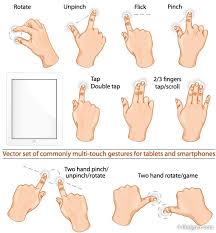
Finger swiping motion within app
Barcode calories transfer
Connecting apple health watches to app
Calorie chart layout
Adding recipes and groceries to calendar
App Icons
Look:
Me with computers behind me
Someone at grocery store scanning barcode to transfer calories
Someone seeing their calories from apple watch gathered from app
Someone using the swiping motion while cooking a recipe from the app.
MoodBoard:










Key Frame Sketches:

Prototyping & Testing Strategy
For my testings on my prototype wireframes, I took the approach of interviewing a few people in person. I additional did an A, B, C poll on Instagram. These two approaches will help provide great feedback on my prototypes which will help guide me on changes and additional thoughts on how to approach my final prototype screens.
Objectives For Week 5:
Product Design Wireframes (due October 30)
Style Guide (due October 30)
Proof of Concept Video: Keyframes (due October 30)
(October 30th)
Week 5:
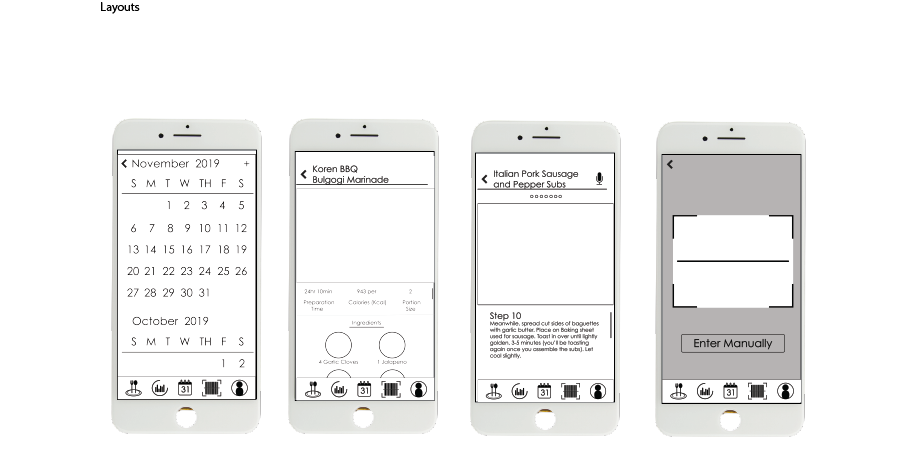
Product Design Wireframes


Style Guide

Proof of Concept Video: Keyframes
Style Frames:
Audio: Music names from bensound.com:
Creativeminds
Endlessmotion
Funkyelement
Goinghigher
Moose
Script:
“Hello. Are you mobile driven to stay on track with your health goals? If you currently are heading towards a healthy lifestyle, you may already have several apps such as a calorie tracker, grocery check list, barcode scanner, and have several recipes pulled up on your internet browser. Do you wish all of these could be in one app to save space on your phone? Well let me introduce you to Cook’n Cloud. Enjoy having the ability to scan your product at the grocery store that instantly adds the calories into our application. If you were wondering about your physical calories you burn throughout the day not being included, don’t worry because you can connect your Apple Health Watch to the app that directly transfers the data to your personal calorie tracker. If you were wondering how you won’t get your phone dirty while cooking, stop wondering. With all iOS products, we provide the ability to swipe your finger above the device which processes your motion to go to the next step within the recipe card. The best part about this app is it will be free.”
Objectives For Week 6:
User Testing Outcomes (due November 6)
Proof of Concept Video: Final Storyboards (due November 6)
Revised scenarios
(November 6)
Week 6
User Testing Outcomes
Based on the information provided to me by personal interviews and answers received by my Instagram poll, I received some good feedback. Based on the feedback provided to me from my personal interviews, the users were satisfied with the layout of my lo-fi wireframes. One did mention how they were concerned that the user would have to instantly put information into the app before seeing the homepage and other tabs and most likely would deter from using it. I took that into play by doing some more research of other healthy apps and all made me put personal information into them at the beginning. I decided to get rid of adding a password at the beginning because my app isn’t meant to be a secure app such as a bank app. For my A, B, C testing poll information gathered from Instagram, the majority of the answers I receive were A answers for the color arrangement. Based on this feedback, I will make sure to have all of my screens based on the four color palette I chose and make sure to keep specific icons consistent with this decision.
Proof of Concept Video: Final Storyboards


Revised Scenarios
Scenario 1:
Jennifer’s alarm goes off at 6:00am. She likes to hit snooze a couple of times eventually getting out of bed around 6:30am. Once she officially gets out of bed, she grabs her already brewed coffee that she sets to be ready by 6:15am so it is cool enough to drink right away. She grabs a protein bar and sits out on her balcony to eat and drink her coffee. After drinking her coffee and eating her protein bar, it’s around 6:50am and Jennifer gets ready for her quick run outside. She does a 2-mile run around her neighborhood for about 14 minutes. When she gets home, she begins to make breakfast consisting of two eggs, two slices of bacon, half an avocado, and a side of toast. While she eats her breakfast, she opens the Cook’n Cloud app on her iPhone 7. She taps on the calorie tab. Then she taps on the plus button next to breakfast. She selects another plus button to add her coffee portion, protein bar calories, two eggs, two slices of bacon, half an avocado, and one slice of bread. All the calories are calculated for Jennifer within the app except for the protein bar which she had to input herself. She could have scanned the protein bars barcode but chose to put it in herself by taping on the space across from where she typed protein bar. The calories she lost from her run earlier was already calculate because she connected her apple watch to the app.
Jennifer is a healthy athletic runner who decided to download the Cook’n Cloud app to focus on her healthy lifestyle. She enjoys a coffee and protein bar before her morning run and then has her typical eggs, bacon, toast, and avocado breakfast before going to work. The calories she burned during her run were calculated into the app based on the information gathered form her apple health watch.
Scenario 2:
Kristen’s alarm goes off at 4:45am. She gets ready for work. Around 5:30am, she has time to have a cup of coffee before leaving for work at 6:15am. Around 1:00pm, it’s lunch time. She goes to the grocery store during her break and gets a custom sandwich from the deli. She is able to input her calories for the sandwich because there is a barcode available. Kristen opens the Cook’n Cloud app. She taps on the barcode scanner and scans the barcode. The calories are then calculated into the calories section but asks where she would like to add the calories. She is provided the options to add the sandwich either to breakfast, lunch, dinner, or snack. Kristen selects lunch and then hits the next button at the bottom of the page. It then transfers her to the calories main page so she can see her progress.
Kristen is a busy mother with three kids. She has had trouble managing her weight after birthing three children and struggles to stick to a diet. Kristen downloaded the Cook’n Cloud app to help her decide healthy meals for dinner to feed her family. Also, to see her calorie progress which she has always struggled to calculate. She was intrigued with the barcode scanner and how it calculated her meals for her with this simple feature.
Scenario 3:
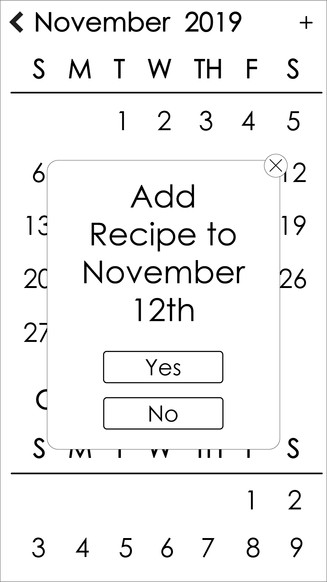
Tom wakes up 10 minutes before his alarm at 5:00am as he usually does. He works as a personal trainer and has his first client at 7:00am. He walks to work and gets there around 5:45 giving him plenty of time to grab a cup of coffee from work and do his quick warm up with another personal trainer. During his warmup, his calories are calculated by his apple watch which transfers the information to the Cook’n Cloud app. After his second client of the day, Tom has his favorite protein shake. After two more personal training sessions, he is done with work and heads to the grocery store. As soon as her gets there, he pulls up the Cook’n Cloud app and on the calendar icon, he taps on the day. He taps on the recipes he had added to his calendar for the day to see the ingredients list. He adds a prepped lunch and dinner recipe to his calendar. As he picks up ingredients, he uses the barcode scanner to add the calories. For each ingredient, the app asks where he would like to add the ingredient. He is provided with the option the add the ingredients either to breakfast, lunch, dinner, or snack. Tom selects lunch and/or dinner depending on the ingredient. He then hits the continue button at the bottom of the page to continue scanning. After gathering all the ingredients and checks out, he heads home. If there were ingredients such as soy sauce or carrots, Tom is able to edit the ingredients list if he was only used two carrots and half a cup soy sauce. He would do this by taping on the plus button next to lunch or dinner. It provides all the ingredients he added previously with a plus button next to each one. He would tap on the plus button next to bag of carrots. It would then transfer him to edit the portion used. He taps on the calculate button which then changes the calorie calculation. If Tom is satisfied with the information, he then taps on the finish button and continues with any other ingredients needing adjusted.
Tom is a personal trainer who is passionate about his healthy lifestyle. However, he currently has become divorced and has fallen away from his healthy ways. His wife used to keep track of their calories for them both. Tom downloaded the Cook’n Cloud app because he loves to cook but needed help figuring out ingredient portion size for himself and to keep track of his calories so he can get back on track with his previous healthy lifestyle.
Objectives For Week 7:
User Testing Iterations & Revisions (due November 13)
(November 13th)
Week 7
User Testing Iterations & Revisions


Objectives For Week 8:
Lo-Fi product design (due November 18)
Proof of Concept Video: Final Video (due November 18)
(November 18)
Week 8
Lo-Fi Product Design




Proof of Concept Video: Final Video
Final Prototype
Objectives For Week 9:
Hi-Fi Product Design (due December 2)
Outcomes and Final Evaluation (due December 2)
Additional Resource (due December 2)
(December 2)
Week 9
Hi-Fi Product Design


Outcomes and Final Evaluation
Additional Resources
Images:
Interviews:
Quote:
Objectives For Week 10:
DRY RUN PRESENTATION (due December 4)
Week 11:
Objectives For Next Week:
Final Formal Presentation(submit and present on FINAL CLASS, December 11, 6:30-8:30*)


Comments